












KingHills Casino — Password Recovery and Secure Access
KingHills Casino Login: Quick Access to Your Account
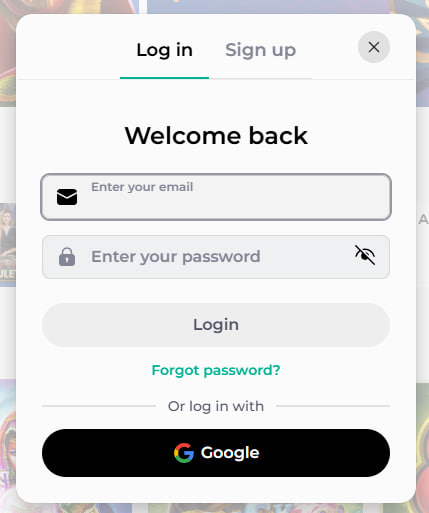
KingHills Casino provides a secure login process with password recovery and two-factor authentication for players.
Once you're through the door, your personalised dashboard opens up immediately: your balance, active bonuses, recent game history, and the full game library — all right there. The platform remembers your preferences, so returning players land exactly where they left off. Picture this scenario: you close a session on mobile at midnight, and when you log back in the next morning, everything is exactly as you left it.
What You Can Do Immediately After Signing In
After a successful KingHills Casino sign in, your account dashboard becomes your command centre. You can check pending withdrawals, claim any waiting promotions from the bonus page, or jump straight into a live dealer table. Nothing is gated behind additional steps.
The platform also surfaces personalised game recommendations based on your session history, so you're never staring at a blank screen wondering what to play next. Deposit methods are pre-loaded for returning players, cutting checkout time to a handful of taps on mobile.
Why Fast Login Matters on Mobile
Mobile sessions tend to be shorter and more intentional than desktop sessions. Our login flow was redesigned specifically with touch interfaces in mind — large tap targets, auto-fill compatibility, and biometric shortcut support all work together to get you from the lock screen to live gameplay in under fifteen seconds on most modern devices.
We've also optimised the login page to load in full on 4G connections without waiting for heavy assets. The form is lightweight, responsive, and renders correctly in both portrait and landscape orientations. That's not an accident — it's a deliberate architectural choice we made to serve players on the go.
How to Sign In to KingHills Casino: Step by Step
Step 1: Go to KingHills Casino
Open your mobile browser or the KingHills app and navigate to kinghilllscasino.com. On the homepage, the Login button sits prominently in the top-right corner — it's visible immediately without scrolling, on screens as small as 320px wide. Tap it once to open the sign-in panel.
If you're using the native app, the login screen loads as the default entry point when you're signed out. The app version skips the browser rendering step entirely, which shaves a noticeable amount of time off the process on older Android devices in particular.
Step 2: Enter Your Credentials
Type in the email address you registered with and your KingHills Casino password. On mobile, we recommend using a password manager like 1Password or the native iOS/Android keychain — both are fully compatible with our login form's autocomplete attributes, so your credentials fill in with a single tap.
If you're on a personal device, enabling the "Remember me" toggle means your email is pre-populated on every return visit. You'll only need to enter your password — or use biometric authentication if you've set that up. Avoid saving credentials on shared or public devices.
Step 3: Two-Factor Authentication
If you've enabled two-factor authentication on your KingHills Casino account — which we strongly encourage — you'll be prompted for a verification code after entering your password. This code is delivered either via an authenticator app like Google Authenticator or via SMS to your registered phone number.
On mobile, this step is particularly seamless: if you use SMS-based 2FA, most modern Android and iOS devices automatically detect the incoming code and offer to autofill it directly into the field. The whole step takes about five seconds. Authenticator apps work offline, which is useful if you're in an area with spotty signal.
Step 4: Access Your Account
After successful authentication, you land directly on your player dashboard. On mobile, the interface adapts to your screen size — the game grid shifts to a two-column layout in portrait mode, and expands to four columns in landscape. Navigation is bottom-anchored for thumb-friendly access, so your most-used sections are always within reach.
From here, you can browse the full mobile game library, manage your KingHills Casino account settings, initiate deposits via Apple Pay, Google Pay, or card, and access live support through the chat widget — all without leaving the app or switching tabs.
Troubleshooting Login Issues
Forgot Your Password
It happens to everyone. Here's the exact recovery process to get back into your account without losing any data:
- Tap the "Forgot password?" link directly below the password field on the login screen.
- Enter the email address associated with your KingHills Casino account and tap Send Reset Link.
- Check your inbox — the reset email typically arrives within two minutes. Check your spam folder if it doesn't appear.
- Open the link on your mobile device, create a new KingHills Casino password (minimum 8 characters, mix of letters and numbers recommended), and confirm it. You'll be logged in automatically after saving.
The reset link expires after 30 minutes for security reasons. If it expires before you use it, simply repeat the process — there's no limit on how many reset requests you can make.
Account Locked
Your account may be temporarily locked after several consecutive failed login attempts — this is an automated security measure, not a permanent restriction. The lockout typically lifts after a short cooling-off period. If you need immediate access, our live support team can verify your identity and unlock the account manually.
Accounts can also be suspended for verification purposes if our system flags unusual activity — for example, a login attempt from a new country while your usual location is different. In these cases, you'll receive an email with instructions. Responding promptly with the requested ID documents resolves most cases within a few hours.
Browser and App Issues
If the login page isn't loading correctly in your mobile browser, the first step is to clear your browser cache and cookies. On Chrome for Android: Settings → Privacy and Security → Clear browsing data. On Safari for iOS: Settings → Safari → Clear History and Website Data. This resolves the majority of display glitches.
We support all major mobile browsers: Chrome, Safari, Firefox, and Samsung Internet. If you're running an outdated browser version, some form elements may not render correctly — updating to the latest version almost always fixes this. Alternatively, switching to the native app bypasses browser compatibility issues entirely.
Keeping Your KingHills Casino Account Secure
Password Best Practices
Your KingHills Casino password is the primary line of defence for your account and funds. Use a password that's at least twelve characters long and combines uppercase letters, lowercase letters, numbers, and at least one symbol. Avoid using the same password across multiple sites — if another service is breached, reused passwords become a direct vulnerability.
We recommend generating a unique password using a dedicated manager and never writing it in a notes app or text file on your device. Update your password every few months, especially if you've ever logged in on a shared or public device.
Two-Factor Authentication and Session Management
Enabling 2FA is the single most effective step you can take to protect your account beyond a strong password. Even if someone obtains your login credentials, they cannot access the account without the second factor. Set it up in Account Settings under the Security tab — it takes less than two minutes.
Always sign out of your KingHills Casino account when using a shared device or public Wi-Fi. The platform automatically logs out inactive sessions after a set period, but manually signing out adds an extra layer of protection. On the app, Face ID and fingerprint unlock are tied to your device only — they can't be replicated remotely.
Mobile Login at KingHills Casino
Browser vs Native App
Imagine stepping into the platform from your phone's home screen with a single tap — that's the native app experience. The KingHills app is available for both iOS and Android, and it delivers a login flow that's noticeably faster than the browser version on most mid-range devices. The app stores your session token securely in the device's encrypted storage, which means fewer full logins over time.
The browser version is a solid alternative if you prefer not to install an app, and it performs well on 4G and 5G connections. The mobile site is a progressive web app, meaning it can be added to your home screen and behaves similarly to a native install — including offline caching of the login form itself.
Biometric Login and Remember Me
Once you've signed in on the app at least once, you can activate biometric authentication — Face ID on iPhone, fingerprint on Android — through the Security section of your account settings. From that point forward, KingHills Casino sign in on mobile is a single glance or touch. No typing required.
The "Remember me" option on the browser version stores your email address locally, so returning visits only require your password. Combine this with your device's autofill and you're looking at a two-tap login. Push notifications are also available through the app — opt in to receive alerts about account activity, which doubles as a real-time security monitor.
KingHills Casino Login Methods Overview
Here's a clear breakdown of every way you can access your account, along with the security level each method provides:
| Login Method | Availability | Security Level |
|---|---|---|
| Email + Password | Browser & App (iOS/Android) | Standard |
| Email + Password + 2FA | Browser & App (iOS/Android) | High |
| Mobile App with Session Token | iOS & Android App | High |
| Biometric (Face ID / Fingerprint) | iOS & Android App | Very High |
| Home Screen Web App (PWA) | Mobile Browser (all major) | Standard to High |
We recommend combining the native app with biometric login and 2FA for the most secure and frictionless experience. This setup takes about five minutes to configure and pays dividends every single session after that.
Ready to Play: Log In and Get Started
Here's what we've built: a login system that respects your time, protects your funds, and works as well on a phone in your pocket as it does on a widescreen monitor. Every detail — from the auto-filling email field to the biometric shortcut — exists because mobile players deserve a first-class entry point, not an afterthought.
If your account is ready, head straight to the login page and you'll be playing within seconds. New to the platform? Create your KingHills account today and discover why the mobile experience here is built differently from the ground up. Everything starts with that first sign-in — and at KingHills Casino, we've made sure it's worth it.